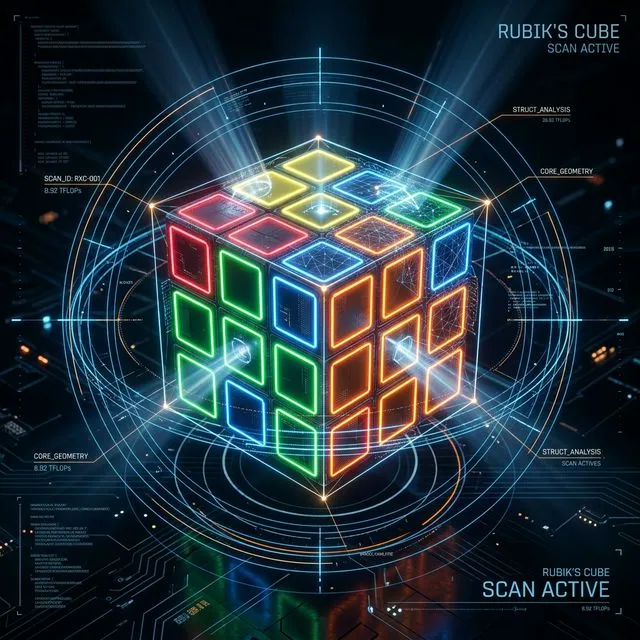
If you have ever tried to solve a Rubik’s Cube, gotten hopelessly stuck, and finally downloaded an app to just scan the thing and tell you the answer, you aren’t alone.
Whether you’re a parent trying to fix a messy cube for a crying 8-year-old, or an adult who just wants to finally conquer this puzzle after years of giving up, a scanner app feels like magic. But if you’ve actually used one before, you probably noticed something incredibly frustrating: the camera almost always gets the colors wrong.
We live in an era where Artificial Intelligence can write computer code, and self-driving cars can navigate chaotic city streets using real-time cameras. Yet, if you point those same advanced computer vision algorithms at a plastic puzzle toy from the 1980s, they completely panic.
It turns out, teaching an AI to simply “see” a Rubik’s Cube is incredibly difficult. Research teams and app developers treat Rubik’s Cube scanning as a major computer vision problem, not just a small feature. Here is why taking a simple photo of your cube defeats modern technology.
The Illusion of “Just Take a Photo”
To human eyes, a Rubik’s Cube is just a box with colored stickers. Our human brains are incredibly good at filtering out bad lighting or weird angles instantly. But to successfully scan a cube, an app can’t just take a static picture; it has to do three complex things at the exact same time:
- Find the cube and isolate exactly 54 tiny colored squares in the camera view, even if your hands are shaking, the cube is tilted, or it’s slightly out of focus.
- Determine the true color of each sticker, fighting through whatever weird living room lighting, deep shadows, or screen glare you happen to have.
- Rebuild a mathematically perfect 3D object in the computer’s memory to ensure the cube actually exists in reality, tracking exactly which side is which.
If the app fails at even one of these steps, the entire process breaks down, and you are left with a screen full of errors.
The Ultimate Enemy: Your Living Room Light
The biggest challenge in cube scanning is something researchers call “color drifting.”
Remember the famous internet debate over “The Dress” that some people saw as black and blue, while others saw it as white and gold? That is exactly what happens to your phone’s camera when looking at a Rubik’s Cube.
When you look at a cube in a dimly lit room, your human brain instantly color-corrects the shadows. You know exactly what color you are looking at. But a phone camera is just a dumb sensor guessing at light wavelengths.
For computers, Rubik’s Cube colors fall into two notorious “danger zones” that frequently blend together:
- The Warm Zone (Yellow, Orange, and Red): Under normal indoor lightbulbs (which cast a warm, yellowish glow), white stickers look yellow, yellow stickers look orange, and orange stickers look red.
- The Cool Zone (Blue and Green): In the shade or under harsh fluorescent lighting, blue and green become an indistinguishable, muddy teal to a camera sensor.
What the human eye can differentiate effortlessly in a fraction of a second, a computer algorithm struggles to categorize at all. In an academic paper on Rubik’s Cube color recognition, researchers noted that lighting changes cause colors to shift so dramatically that standard, pre-trained AI models almost always fail in real-world conditions.
The Hardware Lottery: Not All Cameras “See” the Same
Even if your lighting is perfect, the camera hardware itself acts as a second barrier.
Every smartphone manufacturer programs their cameras to make photos look “pretty.” An iPhone might automatically warm up the colors of a photo, while a Samsung might boost the contrast to make the image pop. While this is great for selfies, it destroys the raw color data that a Rubik’s Cube scanner needs.
Furthermore, switching between your rear camera and your front-facing selfie camera changes everything. Front cameras capture an inverted (mirrored) perspective and often have smaller sensors that struggle with edge detection. A high-end smartphone might resolve the outline of a sticker perfectly, while a standard 720p laptop webcam blurs the edges into a messy gradient.
To see how drastically a camera sensor and exposure settings can change a cube, look at the raw 2D scanner data below:
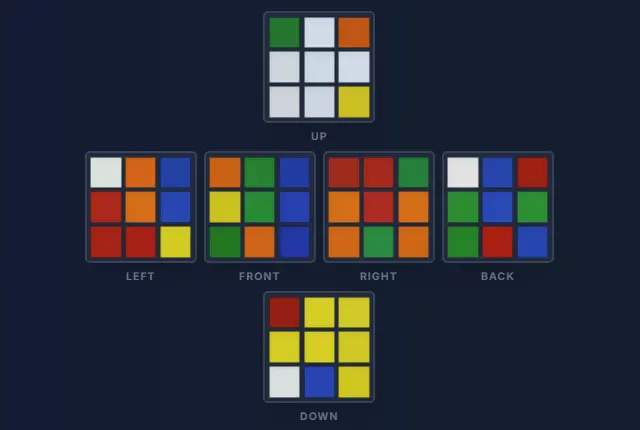 Above: A camera sensor picking up distinct, easily readable colors. The red and orange are clearly separated.
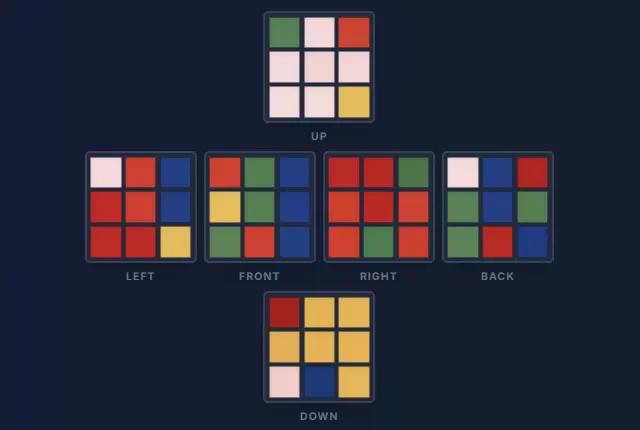 Above: The exact same cube on a different camera sensor. Automatic exposure and white balance have triggered the “Warm Zone” trap, blending the reds and oranges so heavily that even a human eye struggles to tell them apart.
Because of these hardware inconsistencies, a good scanner can’t just use a hardcoded list of colors. It must use “adaptive thresholding”—a computer vision technique that actively recalibrates itself to your specific camera’s quirks in real-time.
The Science of “Seeing” the Cube
To solve the lighting problem, our scanner doesn’t just look at colors; it looks for geometry. Using real-time edge detection, the algorithm identifies the 3x3 grid and “locks on” to each individual sticker (represented by the green borders and numbers you see below).
By isolating each square before analyzing the color, the system can filter out glare and shadows that would normally confuse a standard camera.
Our scanner uses real-time edge detection to lock onto the cube geometry.
One Wrong Sticker Ruins the Universe
So, what happens if the glare from your window makes one single orange sticker look red?
The scanner doesn’t just give you a slightly wrong answer—it crashes the entire solution.
A detailed robotics thesis from Imperial College London explicitly warns that “a single wrongly recognised colour leads to a completely different cube state.”
A Rubik’s Cube operates under strict mathematical laws. A corner piece will always have three colors. An edge piece will always have two. If the scanner accidentally reads a piece as having two yellow stickers, the computer knows that piece is physically impossible.
Even worse, if you (or your kids) accidentally dropped the cube and a plastic piece popped out and was put back in backwards, the geometry is broken. Just 1 wrong color out of 54 means the app is looking at a scramble that literally does not exist in our universe. If the app doesn’t have a smart way to catch this error, the solver will just freeze, reject your scan, or give you a nonsense sequence of moves that leaves your cube worse than before.
Let the Computer Do the Hard Work
If you’ve ever felt “not smart enough” to solve a Rubik’s Cube, or felt frustrated when a YouTube tutorial didn’t make sense, take a step back. This puzzle is so mathematically complex that just looking at it is a struggle for modern artificial intelligence!
You don’t need a genius IQ to fix a Rubik’s Cube, and you shouldn’t have to fight with a glitchy camera scanner just to get your puzzle back to normal.
That is exactly why we built the CubeUnstuck Digital Tutor.
We know that bad lighting happens. We know that every phone camera is different, and we know you don’t want to memorize algorithms. Our Smart AR Scanner uses advanced alignment overlays and guided step-by-step checks to ensure we capture your exact cube state perfectly on the first try. If your child twisted a corner by accident, our system will even diagnose the impossible piece and tell you exactly how to physically twist it back.
Stop letting a plastic cube make you feel frustrated. Launch the CubeUnstuck Scanner today and let us guide you to a solved cube. No restarts, no memorization, and no stress.