
You have tried to learn the Rubik’s Cube. Probably more than once.
You found a YouTube video with a promising title. The person on screen solved the cube while explaining each step, and it looked simple enough. You followed along for the first layer, maybe even the second. Then somewhere around the last layer, you lost track. You rewound the video. Paused. Rewound again. Stared at the cube in your hands, then at the screen, then back at the cube. Nothing matched.
You put the cube down and told yourself you would try again later. That was six months ago.
This is not a you problem. This is a tutorial problem. And it has been the same tutorial problem for over a decade.
The Curse of Knowledge
There is a well-documented phenomenon in teaching called the curse of knowledge: once you know something, you cannot remember what it was like not to know it. Every Rubik’s Cube tutorial on the internet is written or filmed by someone who already knows how to solve the cube. Most of them have been solving it for years.
This creates a specific blind spot. The tutorial creator skips the parts that feel obvious to them — but those are exactly the parts where beginners get lost.
One Reddit user captured this perfectly: “It literally sounds like people in these videos are communicating in a completely different language. They present the information as if everyone is already familiar with the concepts, but that is far from the truth.”
Another wrote: “All that needs to be done is for me to be provided a simple, easy-to-understand tutorial with slow, step-by-step instructions delivered with little to no prior knowledge needed. But through all my searching, I have not found a single resource that has come close.”
These are not isolated complaints. They are the default experience.
 Above: The most common Rubik’s Cube learning experience — pausing a video every few seconds, rewinding, and still not understanding what just happened.
The Five Ways Tutorials Break Down
After reading hundreds of beginner complaints and cross-referencing them with what learning science actually says about how people absorb new skills, the same five failure patterns show up again and again.
1. Too much information at once
Cognitive load theory, first described by educational psychologist John Sweller, explains that working memory can hold roughly 3 to 5 new chunks of information at a time. Exceed that, and the brain does not just slow down — it stops processing entirely.
A typical Rubik’s Cube tutorial step looks like this: “Now orient the cube so the yellow face is on top, find the edge that matches the front center color, hold it in the back-left position, and perform R U R’ U R U2 R’.”
That is at least six separate pieces of information — orientation, identification, positioning, holding position, notation decoding, and sequence execution — delivered in a single sentence. Your brain is full before you pick up the cube.
2. The video pace problem
YouTube tutorials move at the creator’s pace, not yours. Even when a creator says “go slow,” they are going slow by their standards — which means fast by yours.
The fundamental issue is that video is linear. You cannot easily loop a single move. You cannot slow down just the confusing part. When you pause to catch up, you lose context for what comes next. When you rewind, you overshoot. The result is a stop-start experience that prevents you from ever building momentum.
One commenter described the fix that worked for them: “I got an app that I could go through step by step with pictures at my own pace. Really helped.” That instinct — self-paced, one step at a time — is exactly what the research supports.
3. Notation without context
Rubik’s Cube notation (R, U, F, L, D, B, and their primed versions) is efficient shorthand for people who already know it. For beginners, it is a wall.
When a tutorial says “perform R U R’ U’,” a beginner has to: recall that R means the right face, determine which direction is clockwise for that face, execute the turn, then immediately do the same mental translation for U, then R’ (which is counterclockwise — but counterclockwise relative to what?), and then U’. That is four separate decode-and-execute cycles in a row, each requiring active mental translation.
The notation is not hard in itself. But learning notation and learning the cube at the same time is like trying to learn to drive while simultaneously learning what the road signs mean. Each one is manageable alone. Together, they overwhelm.
We wrote a full breakdown of this in Rubik’s Cube Notation Explained Without the Jargon. But the bigger point is: a good learning tool should not require you to learn notation at all.
4. No feedback when you make a mistake
In a video tutorial, you do not know you have made a wrong turn until the cube in your hands looks nothing like the cube on screen. By then, you might be three or four moves past the error. There is no undo button on a Rubik’s Cube.
This is where the dropout rate spikes. One wrong move in the middle of a last-layer algorithm can scramble everything you have built. The tutorial cannot see your cube. It cannot tell you where you went wrong. It just keeps going.
A Harvard study on active versus passive learning found that students learn significantly more from active learning — doing the thing and receiving feedback — than from passively watching someone else do it. Students in the study actually felt like they learned more from lectures, but scored higher on tests after active learning sessions. The feeling of ease during a video is an illusion. Real learning feels harder in the moment.
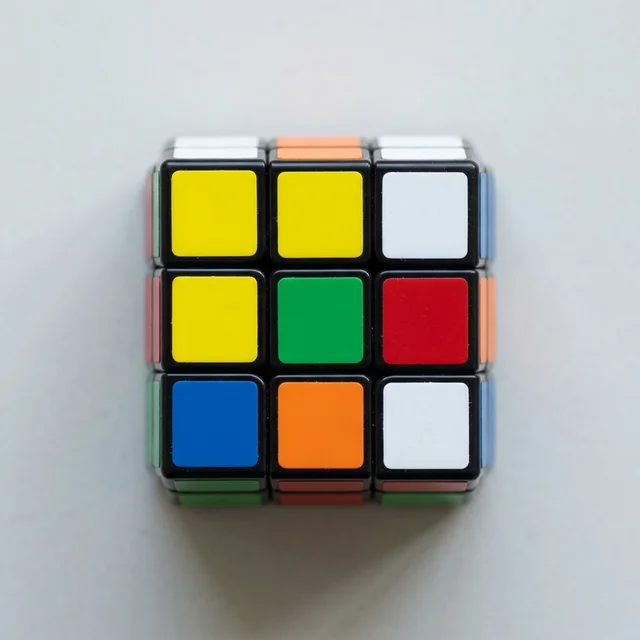 Above: One wrong turn in the last layer can undo 20 minutes of progress. Video tutorials cannot catch this — you only find out when the cube stops matching the screen.
5. One method, no adaptation
Most tutorials teach exactly one path. If your cube does not match the expected state at any point — which happens constantly because scrambles are random — the tutorial has no advice. You are on your own.
Experienced cubers handle this instinctively. They recognize variations and adapt. But a beginner seeing an unexpected arrangement has no framework to distinguish “this is a normal variation I need to handle differently” from “I made a mistake and need to start over.”
The result: beginners restart from scratch far more often than necessary, because the tutorial gave them no way to diagnose what they are actually looking at.
What Actually Works
The research on learning points clearly in one direction. Effective skill acquisition requires:
- Small steps. One piece of new information at a time, practiced before the next one is introduced.
- Immediate feedback. You do a thing, you see whether it worked, you adjust. Not five moves later — right now.
- Self-pacing. You move forward when you are ready, not when the video timeline says so.
- Active engagement. You are holding the cube and turning it, not watching someone else turn theirs.
- Visual over symbolic. Seeing which face to turn and which direction, rather than decoding a letter system.
None of this is controversial in education research. Chunking, scaffolding, and active learning are foundational principles in cognitive science. They just have not been applied to most Rubik’s Cube tutorials.
The person who said “do it bit by bit and practise each step loads of times — bottom white side, do it 10 times in a row, bottom layer, another 10, rinse and repeat” was describing exactly what learning scientists would recommend. But most tutorials skip straight to the full solve and hope you can keep up.
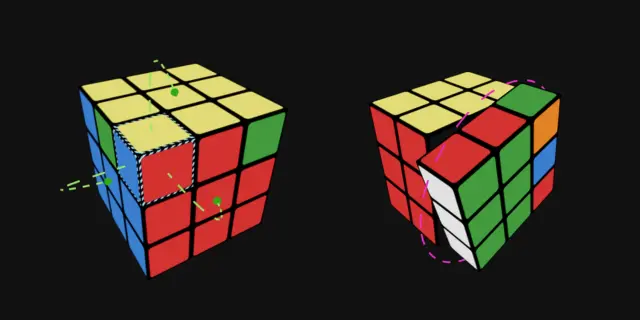 Above: Effective learning looks like this — one move, one result, one confirmation. Not a wall of notation with a “good luck” at the end.
How CubeUnstuck Is Built Differently
CubeUnstuck was designed around these principles — not because we read the research first and then built the app, but because we watched hundreds of people fail with existing tutorials and asked “why?”
The answer was always the same five problems listed above. So the app addresses each one directly.
One move at a time. CubeUnstuck never shows you a sequence. It shows you the next single turn — which face, which direction — with a glowing rotation halo on a 3D model of your actual cube. You turn. You see the result. Then you get the next move.
Your cube, not a generic one. You scan your specific scramble before you start. Every instruction is based on your cube’s actual state, not a hypothetical arrangement that may or may not match what you are holding.
No notation required. There are no letters to decode. Every instruction is visual — an arrow showing which face to turn and which way. If you want to learn notation later, great. But it is never a prerequisite.
Voice-guided, hands-free. You do not need to look at a screen, pause, look at the cube, look back at the screen, and hope you remember what you just saw. The app tells you what to do out loud. Your eyes and hands stay on the cube.
Instant error detection. Because CubeUnstuck knows your cube’s state at every step, it can tell you immediately when something does not match — before a single wrong move snowballs into a full restart.
This is not a tutorial. It is a guide that walks beside you, at your pace, with your cube, one turn at a time. The difference sounds subtle, but it is the difference between watching someone drive and having an instructor in the passenger seat.