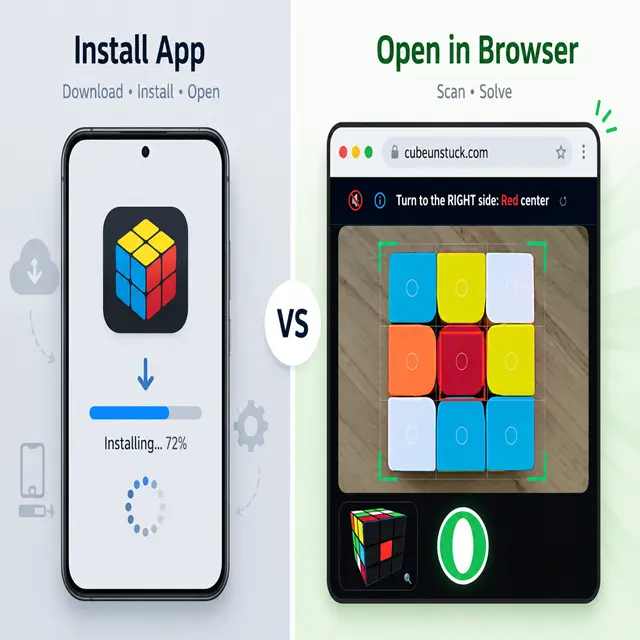
If you’ve searched for a way to solve your scrambled Rubik’s Cube, you’ve probably found two very different paths: download an app from the store, or open a website that scans your cube right in the browser.
Both promise the same result — a solved cube — but they get you there very differently. This guide compares ASolver, one of the most popular camera-scan cube solver apps, against CubeUnstuck, a no-install web-based scanner, so you can pick the right tool for your situation.
⚡ TL;DR: App or web scanner — which is better?
If you only own a 3x3 cube and want the fastest, easiest fix: use a no-install web scanner like CubeUnstuck. No download, no permissions, no storage space, and it works the same on any phone, tablet, or laptop.
If you own multiple puzzle types (2x2, 4x4, Pyraminx, Megaminx, Skewb, etc.) and want a permanent app with training tools: an app like ASolver makes more sense, since it supports far more puzzle shapes.
The Core Difference: Install vs. Instant Access
An app like ASolver requires you to find it in the App Store or Google Play, wait for it to download, grant camera permissions, and keep it installed on your device long-term. A web-based scanner like CubeUnstuck skips all of that — you tap a link, your browser opens the camera, and you’re scanning within seconds.
This matters more than it sounds. Many people searching “cube solver” just want a one-time fix for a cube they got stuck on, not a permanent app taking up storage space. For that use case, not installing anything is a real advantage, not just a convenience.
Feature-by-Feature Comparison
| Feature | ASolver (App) | CubeUnstuck (Web) |
|---|---|---|
| Installation required | Yes (App Store/Play Store) | No — works in any browser |
| Puzzle types supported | 3x3, 2x2, 4x4, 5x5, Pyraminx, Megaminx, Skewb, and more | 3x3 only |
| Camera color scanning | Yes | Yes |
| Detects broken/unsolvable cubes | Yes | Yes, with visual highlight of the exact bad piece |
| Works on desktop/laptop webcam | No (mobile-only app) | Yes |
| Storage space used | Requires app install | None |
| Best for | Cubing enthusiasts with multiple puzzle types | Anyone who just needs their 3x3 solved fast |
| What about Ads? | Free with lots of ads | Free with no ads |
Where the App Wins: Puzzle Variety
If you’re a collector or serious cuber with a 2x2, a Pyraminx, a Megaminx, and a 3x3 sitting on your desk, an app like ASolver is genuinely the better tool — it can scan and solve more than a dozen puzzle shapes, which a 3x3-only web tool simply can’t match. If variety across puzzle types is your priority, this is the honest answer: get the app.
Where the Web Scanner Wins: Speed and Simplicity
For the far more common case — someone with a single 3x3 cube who got stuck mid-solve or found an old scrambled cube and just wants it fixed — a no-install web scanner has three practical advantages:
- No app store detour, no waiting for a download, no permissions screen before you even start
- Works identically on a phone, tablet, or laptop webcam, so you’re not locked to one device
- Nothing lingers on your phone afterward — open it, solve your cube, close the tab
For this specific job, removing every extra step between “I’m stuck” and “my cube is solved” is what actually matters, and that’s the gap a lean web tool is built to close.
FAQ: Picking the Right Tool
Do I need to create an account for either one? No. Both ASolver and CubeUnstuck let you scan and solve without signing up.
Can a web scanner detect a broken/twisted cube like an app can? Yes. A good web scanner checks the same orientation math (corner and edge parity) that a native app does, and can flag the exact broken piece just as precisely.
Which one is more accurate at reading colors? Accuracy depends on the specific scanner’s model and lighting handling, not on whether it’s an app or a website — a well-built web scanner can match or exceed app-based color recognition, especially for tricky colors like red vs. orange under poor lighting.
What if I own more than just a 3x3 cube? Right now, CubeUnstuck focuses specifically on the 3x3 cube, so if you regularly solve 2x2, 4x4, or shape-shifting puzzles, a multi-puzzle app like ASolver will serve you better for those other shapes.
You don’t need to install anything just to fix a stuck 3x3 cube. Try the CubeUnstuck web scanner for an instant, no-download fix — and if you’re a multi-puzzle collector, keep an app like ASolver on hand for everything beyond the classic 3x3.